答案是 YES!

延續 @environment modifier 的話題,當使用 @Entry Macro 在 EnvironmentValues 中來宣告環境變數 value 時,我們無須在 app 的 parent view 端注入 (injection) 這 value 值,它存在是 Global 的,它是全域變數,在 child view 中宣告之後,就可直接拿來使用,它讀到的值,就是在 @Entry 初始化時,設定的預設值。
import Foundation
import SwiftUI
// Define custom environment values using @Entry
extension EnvironmentValues {
var appAccentColor: Color = .pink // <= 初始化為粉紅色
}無須在上層 parent view 注入 environment
import SwiftUI

@main
struct EnvironmentModifierDemoApp: App {
    var body: some Scene {
        WindowGroup {
            // SwiftUI's dependency injection using environment modifier
            ContentView()
                // KeyPath syntax for EnvironmentValues
//                .environment(\.appAccentColor, .orange)               <= 無須在 parent view 注入
        }
    }
}
下層 child view,宣告後,就可以用啦!
import SwiftUI

struct ProductCard: View {

    let product: Product

    // KeyPath syntax: simple configuration values
    @Environment(\.appAccentColor) private var accentColor              // <= keyPath 宣告

    var body: some View {
        VStack(spacing: 8) {
            Text(product.emoji)
                .font(.system(size: 44))

            Text(product.name)
                .font(.headline)

            Text("$\(product.price, specifier: "%.2f")")

            Button {
                cart.addItem(
                    CartItem(
                        id: product.id,
                        name: product.name,
                        price: product.price
                    )
                )
            } label: {
                Text("Add to Cart")
                    .background(Color(accentColor))                             // <= 直接使用
            }
        }
    }
}
結果
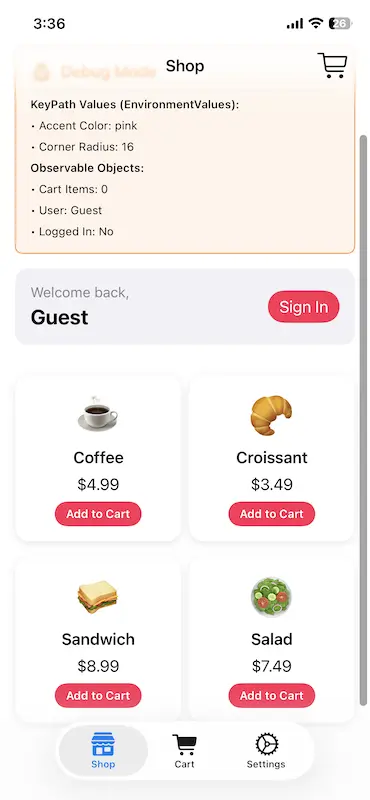
那假設我們不要預設值,要把原本粉紅色,在 child view 中改成藍色,要怎麼做?你要知道這 accentColor 它的型別是 value type,它無法在 child view 被改寫,它是個唯獨的參數,但我們可以在 parent view 透過注入的方式,來修改設定的顏色。
import SwiftUI

@main
struct EnvironmentModifierDemoApp: App {
    var body: some Scene {
        WindowGroup {
            // SwiftUI's dependency injection using environment modifier
            ContentView()
                // APPROACH 1: KeyPath syntax for EnvironmentValues
                .environment(\.appAccentColor, .orange)               // <= 使用 keyPath 的方式來 set,把它改成橘色
        }
    }
}
變成橘色了
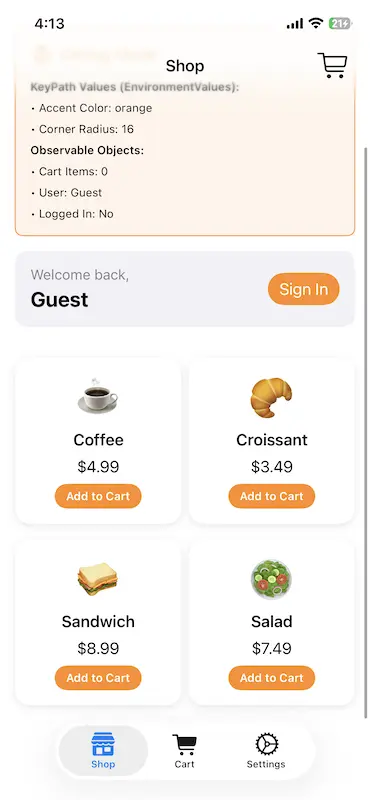
所以使用 EnvironmentValues keyPath 的方式來設定環境變數,有個好處,就是它永遠都有個初始值,即使我們在開發 app 的水深火熱中,忘了注入值也沒關係,child view 不僅有值,而且還不會崩潰,超級安全。
但對比 @observable 物件的寫法,它就必須要在 parent view 時注入,因為它不是全域變數,如果忘了注入或忘了初始化,在編譯時不會有錯,但在執行時 (Runtime) app 就會崩潰,很可怕!
忘了注入或忘了初始化
import SwiftUI
@main
struct EnvironmentModifierDemoApp: App {
// Observable objects are created at the app top level
// @State private var cart = ShoppingCart()
private var cart: ShoppingCart? // <= 忘了初始化
var body: some Scene {
WindowGroup {
// SwiftUI's dependency injection using environment modifier
ContentView()
// .environment(cart) // <= 忘了在 parent view 注入
}
}
}Crash 給你看

結論
- EnvironmentValues + KeyPath:永遠有預設值,可直接讀取
- @observable 物件:必須由 parent view 注入,否則會 crash
所以有時候常常在程式碼中可以看到 SwiftUI 去讀取系統內建的 EnvironmentValue,完全無須初始化也不用設定,也不用注入,這個 Magic 的原因就在此。
import SwiftUI

struct MyView: View {
    @Environment(\.colorScheme) var colorScheme      				// 預設跟隨系統
    @Environment(\.horizontalSizeClass) var sizeClass 				// 預設根據裝置
    @Environment(\.locale) var locale                 				// 預設跟隨系統設定

    var body: some View {
        // 不需要任何 parent view 注入,就能使用
        Text("Current scheme: \(colorScheme == .dark ? "Dark" : "Light")")
    }
}
Demo Project In Github
theLittleApps/EnvironmentModifierDemo: This demo shows two ways to use .environment modifier.
贊助我們
